

Today’s children are growing up in a digital world where smartphones, tablets, televisions, computers, and smart devices are part of everyday life. Whether it’s attending online classes, watching educational videos, playing games, or video calling grandparents, screens have become an unavoidable part of childhood.
While technology offers many learning opportunities, too much screen time can affect a child’s physical health, sleep, learning, emotional development, and social skills. This is why parents often ask:
- How much screen time is healthy?
- At what age should children use mobile phones?
- Is educational screen time different from entertainment?
- How can I reduce my child’s screen addiction?
This comprehensive guide answers all these questions while providing an easy-to-follow screen time chart by age, expert recommendations, and practical parenting tips to help your family build healthier digital habits.
Related: Artificial Intelligence is becoming part of children’s daily lives. Learn how to introduce it safely in our AI for Kids: Parent’s Complete Guide.
What Is Screen Time?
Screen time refers to the amount of time a person spends using digital devices with screens, including:
- Smartphones
- Tablets
- Television
- Laptops and computers
- Gaming consoles
- Smartwatches
- Streaming devices
Screen time includes both educational and recreational activities. However, not all screen time has the same impact.
For example:
✅ Attending an online class
✅ Reading an educational eBook
✅ Learning coding
are generally more beneficial than spending hours scrolling social media or watching random videos.
Why Is Managing Screen Time Important?
Children’s brains are still developing. Excessive screen exposure can interfere with several important aspects of growth, including:
- Sleep quality
- Physical activity
- Social interaction
- Language development
- Attention span
- Emotional regulation
- Academic performance
Balanced screen use allows children to enjoy technology while maintaining healthy lifestyles.
Also Read: Building healthy habits starts with positive communication. Explore our guide on Gentle Parenting Tips Every Mom Should Know.
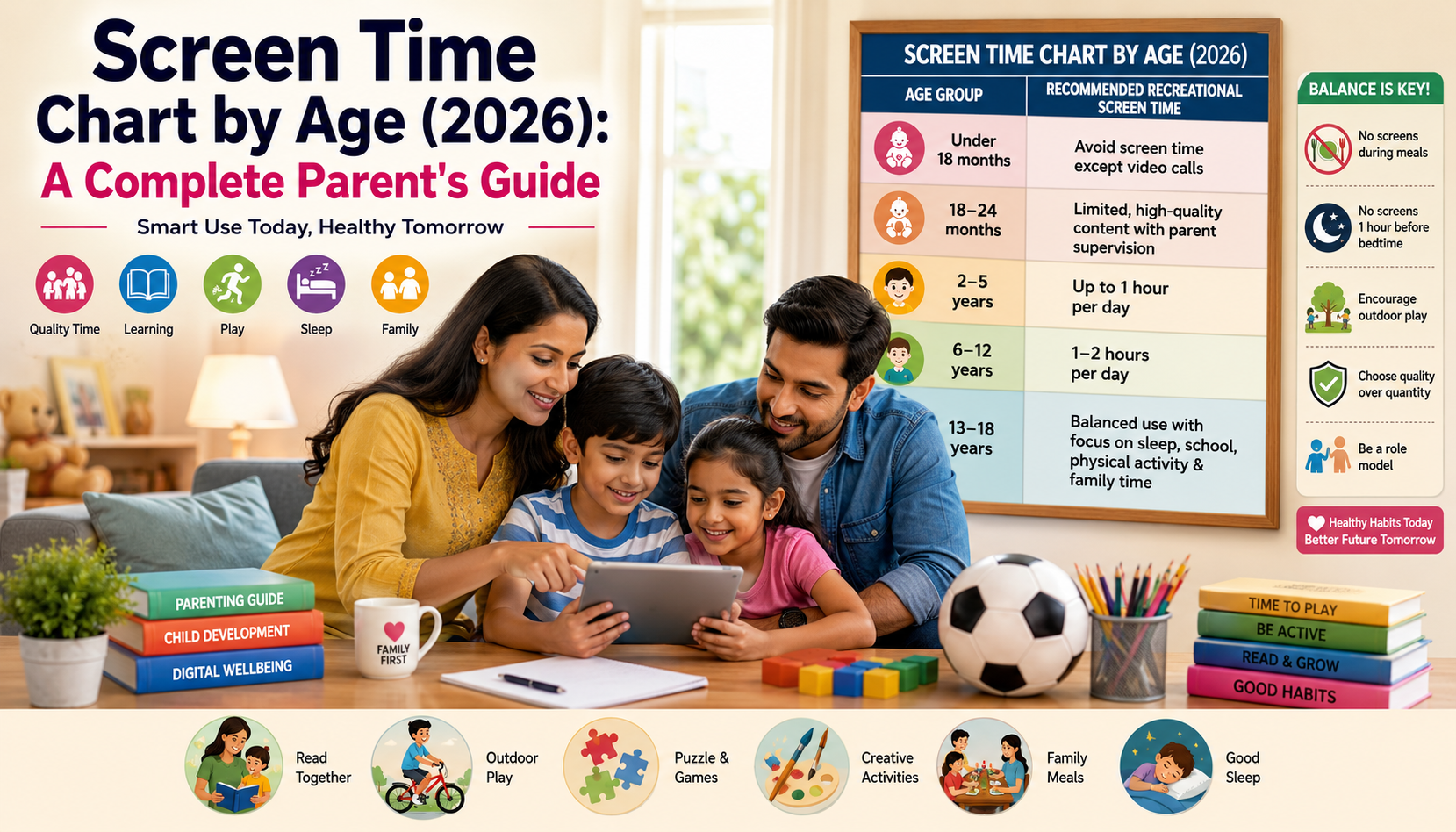
Screen Time Chart by Age (2026)
| Age Group | Recommended Recreational Screen Time |
|---|---|
| Under 18 months | Avoid screen time except video calls with family |
| 18–24 months | Limited, high-quality content with parent supervision |
| 2–5 years | Up to 1 hour per day |
| 6–12 years | 1–2 hours per day with healthy limits |
| 13–18 years | Balanced use with focus on sleep, school, and physical activity |
Important: Educational screen use, homework, and supervised learning may require additional screen exposure. The focus should be on maintaining a healthy balance rather than counting every minute.
Screen Time Recommendations by Age
Babies (0–18 Months)
During infancy, babies learn primarily through real-world interactions.
Experts recommend avoiding screen exposure except for occasional video calls with family members.
Instead, encourage:
- Talking
- Singing
- Reading books
- Floor play
- Eye contact
- Outdoor walks
These activities promote healthy brain development.
Parents Also Read: Looking for more ways to keep children engaged? Check out our Ultimate Guide to the Best Board Games for Families for fun, screen-free activities.
Toddlers (18–24 Months)
Toddlers become curious about screens, but they still learn best through human interaction.
If introducing digital content:
- Choose educational videos.
- Watch together.
- Explain what is happening on the screen.
- Avoid passive viewing.
Co-viewing helps children understand and learn from digital content.
Preschoolers (2–5 Years)
Children in this age group enjoy cartoons, rhymes, educational games, and storytelling.
Limit recreational screen time to about one hour daily.
Parents should prioritize:
- Interactive learning
- Physical play
- Arts and crafts
- Reading together
- Outdoor exploration
Avoid giving screens during meals or before bedtime.
School-Age Children (6–12 Years)
As children begin school, screens become part of learning.
Besides homework, children also use devices for:
- Educational videos
- Research
- Games
- Entertainment
Parents should focus on quality rather than quantity.
Healthy habits include:
- Taking breaks every 30–45 minutes
- No devices during meals
- Encouraging outdoor activities
- Maintaining consistent bedtime routines
Teenagers (13–18 Years)
Teenagers use screens for:
- School assignments
- Social media
- Messaging
- Entertainment
- Online learning
Instead of imposing strict time limits, parents should encourage responsible digital habits such as:
- Screen-free family time
- Device-free bedrooms
- Healthy sleep schedules
- Digital citizenship
- Online safety
Open communication is more effective than punishment.
Educational Screen Time vs Entertainment Screen Time
One of the biggest misconceptions is that all screen time is harmful.
In reality, the purpose of screen use matters.
Educational Screen Time
Examples include:
- Online classes
- Homework
- Learning apps
- Coding
- Reading eBooks
- Language learning
- Educational documentaries
These activities help children develop useful skills.
Entertainment Screen Time
Examples include:
- Watching random videos
- Endless scrolling
- Gaming for several hours
- Social media
- Binge-watching cartoons
Excessive recreational screen use should be balanced with physical activity and offline hobbies.
Benefits of Healthy Screen Time
When used wisely, digital technology can support learning and development.
1. Improves Learning
Educational platforms make learning more interactive.
Children can:
- Watch science experiments
- Learn coding
- Practice mathematics
- Explore geography
- Learn new languages
Technology becomes a valuable learning companion.
Healthy Kids Learn Better: Nutrition also plays a key role in learning and focus. Read our guide on Solutions for Picky Eaters.
2. Encourages Creativity
Children can use technology to:
- Draw
- Create animations
- Build presentations
- Record videos
- Learn music
- Practice photography
Creative screen activities are more beneficial than passive entertainment.
3. Builds Digital Skills
Digital literacy has become an essential life skill.
Children who learn responsible technology use are better prepared for future education and careers.
4. Keeps Families Connected
Video calls help children maintain relationships with grandparents and relatives living far away.
Meaningful digital communication strengthens family bonds.
Risks of Excessive Screen Time
Problems usually arise when children spend long hours on screens without healthy boundaries.
Sleep Problems
Blue light from screens can interfere with melatonin production, making it harder for children to fall asleep.
Avoid screens at least one hour before bedtime.
Reduced Physical Activity
Children who spend more time on devices often spend less time running, playing, or participating in sports.
Regular physical activity supports healthy growth.
Eye Strain
Prolonged screen exposure may lead to:
- Dry eyes
- Blurred vision
- Headaches
- Eye fatigue
Encourage the 20-20-20 rule:
Every 20 minutes, look at something 20 feet away for 20 seconds.
Poor Posture
Using devices for long periods may cause:
- Neck pain
- Shoulder pain
- Back pain
Teach children to sit comfortably and maintain good posture while using digital devices.
Emotional Effects
Too much screen time may contribute to:
- Irritability
- Reduced attention span
- Mood swings
- Difficulty managing emotions
Balancing digital activities with face-to-face interaction helps support emotional wellbeing.
Signs Your Child May Be Spending Too Much Time on Screens
Parents should watch for these warning signs:
- Frequent tantrums when devices are removed
- Loss of interest in outdoor play
- Difficulty sleeping
- Poor concentration
- Declining academic performance
- Complaints of headaches or eye strain
- Reduced family interaction
- Constant desire to check notifications
Recognizing these signs early allows parents to make gradual, positive changes.
Family Fun: Looking for engaging alternatives to screens? Explore our Best Board Games for Families guide.
Healthy Screen Time Habits Every Family Should Follow
Building healthy digital habits starts with simple routines.
✔ Keep devices out of bedrooms.
✔ Create screen-free meal times.
✔ Encourage at least one hour of physical activity every day.
✔ Read books together regularly.
✔ Schedule family game nights.
✔ Use parental controls when needed.
✔ Be a positive role model by managing your own screen use.
How to Create a Healthy Family Screen Time Plan
Managing screen time doesn’t mean banning technology altogether. Instead, it involves creating a healthy routine where digital activities complement—not replace—sleep, physical play, learning, and family time.
Here are some simple rules every family can follow:
Set Daily Time Limits
Create age-appropriate limits for recreational screen use while allowing flexibility for schoolwork and educational activities.
Create Screen-Free Zones
Designate certain areas of your home as screen-free, such as:
- Dining table
- Bedrooms
- Study time
- Family gatherings
Schedule Outdoor Play
Aim for at least 60 minutes of physical activity every day. Activities like cycling, football, swimming, dancing, or simply playing in the park help balance screen exposure.
Lead by Example
Children learn by observing adults. If parents frequently use phones during meals or conversations, children are likely to copy the same behavior.
Screen-Free Activities by Age
Instead of simply taking devices away, replace screen time with engaging alternatives.
Babies (0–2 Years)
- Peek-a-boo
- Storytelling
- Singing rhymes
- Soft toys
- Sensory play
- Outdoor stroller walks
Preschoolers (2–5 Years)
- Building blocks
- Coloring books
- Clay modeling
- Puzzles
- Pretend play
- Gardening with parents
School-Age Children (6–12 Years)
- Reading books
- Board games
- Cycling
- LEGO projects
- Science experiments
- Drawing and painting
- Music practice
Teenagers
- Sports
- Photography
- Journaling
- Volunteering
- Coding projects
- Learning a musical instrument
- Fitness activities
Printable Family Screen Time Rules
Consider displaying these rules near your child’s study area or family room.
Family Digital Agreement
✔ No phones during meals
✔ No screens one hour before bedtime
✔ Homework before entertainment
✔ Devices stay outside bedrooms at night
✔ Ask permission before downloading new apps
✔ Respect online privacy
✔ Balance screen time with outdoor play
✔ Spend quality family time every day
How to Reduce Screen Time Without Arguments
Many parents struggle when children resist turning off devices. These strategies can help make transitions smoother:
Give Advance Warnings
Instead of saying, “Turn it off now,” try:
“You have 10 minutes left.”
Children respond better when they have time to prepare.
Offer Choices
Replace:
“Stop watching TV.”
With:
“Would you like to play outside or do a puzzle after this?”
Giving children choices reduces conflict.
Create a Routine
Children adapt well to predictable schedules.
For example:
- Homework
- Outdoor play
- Dinner
- Reading
- Bedtime
Screens fit into the routine rather than controlling it.
Reward Healthy Habits
Praise children for following screen rules instead of focusing only on mistakes.
Positive reinforcement encourages long-term behavior change.
Common Screen Time Mistakes Parents Make
Even with the best intentions, some habits can unintentionally increase screen dependence.
Using Screens as Babysitters
Occasional use is understandable, but relying on screens to calm children every time they are upset may reduce opportunities for emotional development.
Allowing Unlimited Weekend Screen Time
Children benefit from consistency. Extremely long screen sessions on weekends can disrupt sleep and routines.
Giving Phones Before Bed
Blue light from screens can delay sleep and affect sleep quality.
Instead, encourage:
- Reading books
- Quiet conversations
- Relaxing music
Ignoring Your Own Screen Habits
Children notice when parents are constantly checking phones.
Creating family-wide screen rules works better than rules only for children.
Frequently Asked Questions
How much screen time is healthy for children?
Healthy screen time depends on age. Babies under 18 months should avoid screens except for video calls, while older children benefit from balanced recreational screen use combined with physical activity, sleep, and learning.
Does educational screen time count?
Yes, but educational activities generally provide more value than passive entertainment.
Parents should still encourage regular breaks during online learning.
Can too much screen time affect sleep?
Yes.
Using screens before bedtime may interfere with melatonin production, making it harder for children to fall asleep and stay asleep.
Is screen time bad for brain development?
Not necessarily.
High-quality educational content, watched in moderation with parental involvement, can support learning.
Problems arise when excessive recreational screen use replaces sleep, exercise, reading, or social interaction.
How can I reduce my child’s screen addiction?
- Set clear family rules.
- Encourage outdoor activities.
- Offer engaging alternatives.
- Keep devices out of bedrooms.
- Be a positive role model.
- Spend quality time together.
Expert Tips for Parents
Child development experts recommend focusing on healthy digital habits rather than simply counting screen hours.
The goal is to ensure that children have enough time for:
- Sleep
- Outdoor play
- Reading
- Family conversations
- Homework
- Creative activities
- Physical exercise
Technology should support these experiences—not replace them.
Quick Screen Time Checklist for Parents
Before giving your child a device, ask yourself:
- ☐ Is the content educational or age-appropriate?
- ☐ Have I set a time limit?
- ☐ Will my child take regular breaks?
- ☐ Has my child been physically active today?
- ☐ Are screens being avoided before bedtime?
- ☐ Am I modeling healthy screen habits?
- ☐ Is my child spending enough time with family and friends?
- ☐ Have I discussed online safety?
If you answered “Yes” to most of these questions, your child is more likely to have a balanced relationship with technology.
Final Thoughts
Technology is an important part of modern childhood, but healthy development depends on balance.
Instead of fearing screens or allowing unlimited access, parents should guide children toward responsible digital habits.
Remember:
The goal isn’t to eliminate screens—it’s to make screen time meaningful, age-appropriate, and balanced with real-world experiences.
When families create consistent routines, encourage outdoor play, and use technology intentionally, children can enjoy the benefits of digital learning while growing into healthy, confident, and socially connected individuals.
Trusted Resources & Further Reading
For evidence-based guidance on children’s screen time, digital wellbeing, sleep, and healthy media habits, explore these trusted resources:
- HealthyChildren.org (American Academy of Pediatrics) – Media & Screen Time Resources
- American Academy of Pediatrics (AAP) – Media and Children
- World Health Organization (WHO) – Guidelines on Physical Activity, Sedentary Behaviour and Sleep for Children Under 5 Years
- UNICEF Parenting – Expert Advice for Parents
- Common Sense Media – Screen Time, Digital Citizenship & Family Technology Reviews
Editorial Note: This article has been prepared using guidance from globally recognized organizations, including the American Academy of Pediatrics (AAP), the World Health Organization (WHO), UNICEF, and Common Sense Media. Every child is different, so parents should use these recommendations as practical guidelines while considering their child’s age, developmental needs, learning requirements, and overall wellbeing.


[…] screen time may reduce opportunities for real-life interaction, which is essential for language […]